When an ER diagram needs EER concepts
Enhanced Entity Relationship modeling adds ways to express structures that basic entity and relationship shapes cannot describe clearly. Use these shapes when the requirements contain subtype membership, a category drawn from several entity types, or a relationship that needs to participate in another relationship.
Choose the simplest structure that expresses the rule. Separate entities are often enough for independent business objects. Add ISA, categories, or aggregation when their meaning explains a rule that would otherwise be hidden in a label or a note.
Build an ISA specialization
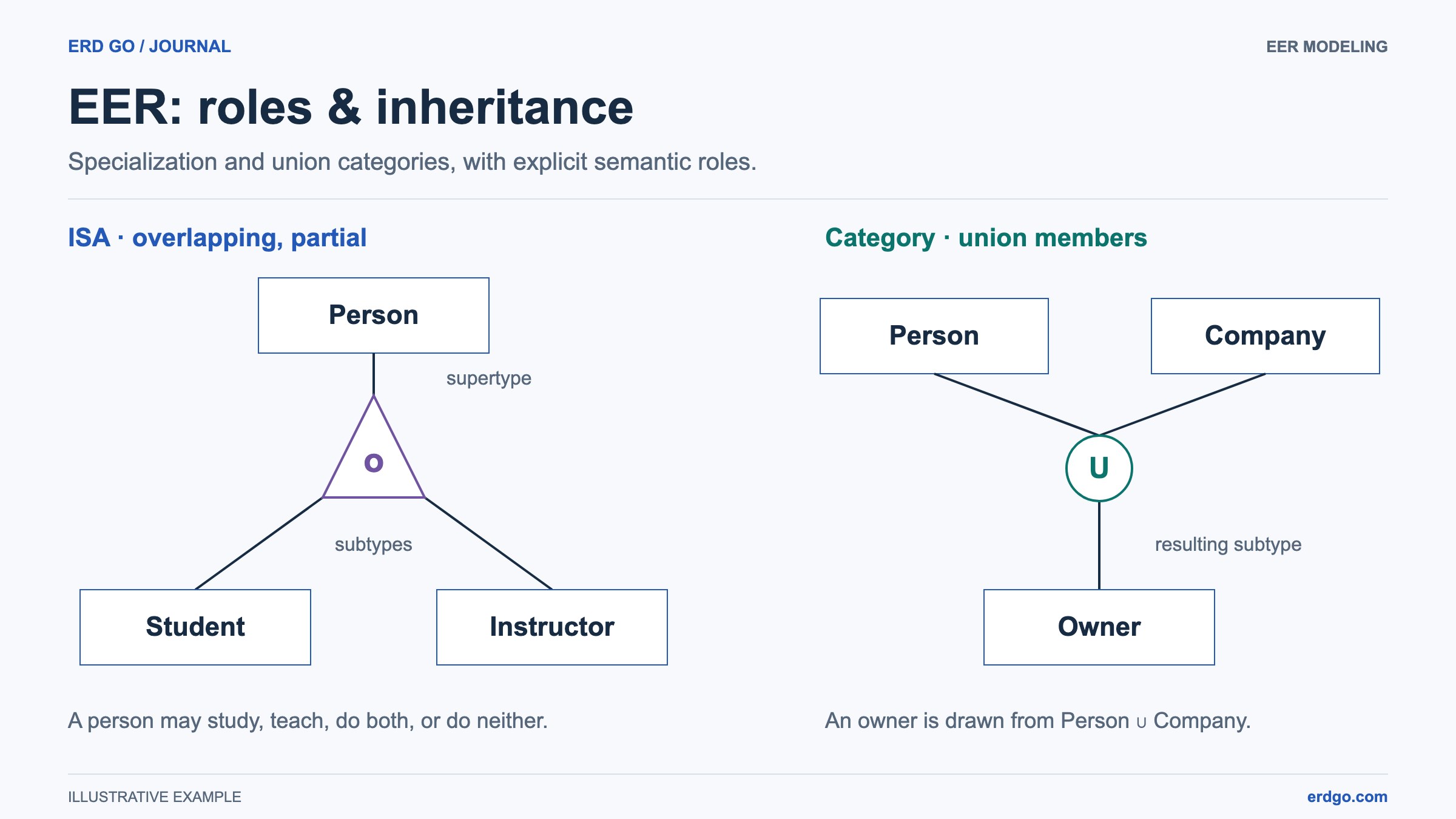
Suppose a Person may be a Student, an Instructor, or both. Create those three entities and an ISA shape, then connect each entity to ISA. Person is the supertype; Student and Instructor are subtypes.
Select each connector and set Entity role in ISA to Supertype (parent) or Subtype (child). ERD Builder does not infer roles from whether an entity sits above or below the triangle. An attractive layout can still describe an incomplete model until the roles are assigned.
Shared attributes belong on Person, while student-specific and instructor-specific attributes belong on their respective entities. This keeps the conceptual model readable before you choose how to represent the hierarchy in SQL.
Choose membership and coverage independently
Select ISA to set its two constraint dimensions. Disjoint means an instance belongs to at most one subtype in that branch. Overlapping permits several. Total coverage requires every supertype instance to belong to a subtype; partial coverage allows instances outside them.
For Person, Student, and Instructor, overlapping membership is appropriate if a student can also teach. Partial coverage is appropriate if the system also stores people who are neither. A different requirement can justify a different combination.
The ISA badge shows d or o and its coverage. Hiding the ISA label changes presentation only. Editing its text or making a connector double does not set the branch constraints; use the dedicated Inspector options.
Use a union category for different source types
A union category describes a result whose members come from different entity types. For example, an Asset Owner might be either a Person or an Organization. This is a different question from splitting one Person supertype into Student and Instructor.
Create Person, Organization, Asset Owner, and a Category shape. Connect the three entities to the category. Set Person and Organization connectors to Union member, and the Asset Owner connector to Resulting subtype. The result must be distinct from the members.
Choose Partial union when only some source instances are included, or Total union when the result covers the whole union. Model checks help you find missing roles or an incomplete member set. Moving shapes does not assign membership.
Treat a relationship as a participant with aggregation
Imagine an Employee works on a Project, and a Manager monitors that assignment. The manager monitors a specific Employee–Project pairing, not the employee or the project independently. Aggregation gives that existing relationship a higher-level identity in the conceptual diagram.
Model Employee works on Project first. Add an Aggregation shape and connect it to works on, then connect the aggregation into a monitors relationship with Manager. The Builder uses explicit connections to identify this structure; merely drawing a boundary near several shapes does not establish it.
Keep the aggregation name specific, such as Project Assignment, and check both the underlying relationship and its higher-level participation. Use a note for unresolved implementation questions instead of leaving the structural meaning implicit.
Review the model before implementing tables
Convert ERD to SQL maps specialization to subtype tables with shared parent identities and maps union categories to checked member references. Choose any unassigned roles and identify the relationship represented by each aggregation. Conversion notes explain total coverage, disjoint membership, and participation rules that require application logic or triggers. Save the conceptual file, review the generated schema, and verify those constraints in your chosen database.
- Every ISA branch has one assigned supertype and its intended subtypes.
- Membership and coverage match examples allowed by the business rules.
- Each union category has at least two members and one distinct result with explicit connector roles.
- Aggregation connects to the relationship it represents and participates in another relationship.
- Model checks are reviewed alongside real scenarios; a clean check list is not a guarantee of a correct design.
References and further reading
Try the model on your own canvas
Build, check, and export a Chen or EER diagram in your browser.
Open ERD Builder →