Read the basic Chen symbols
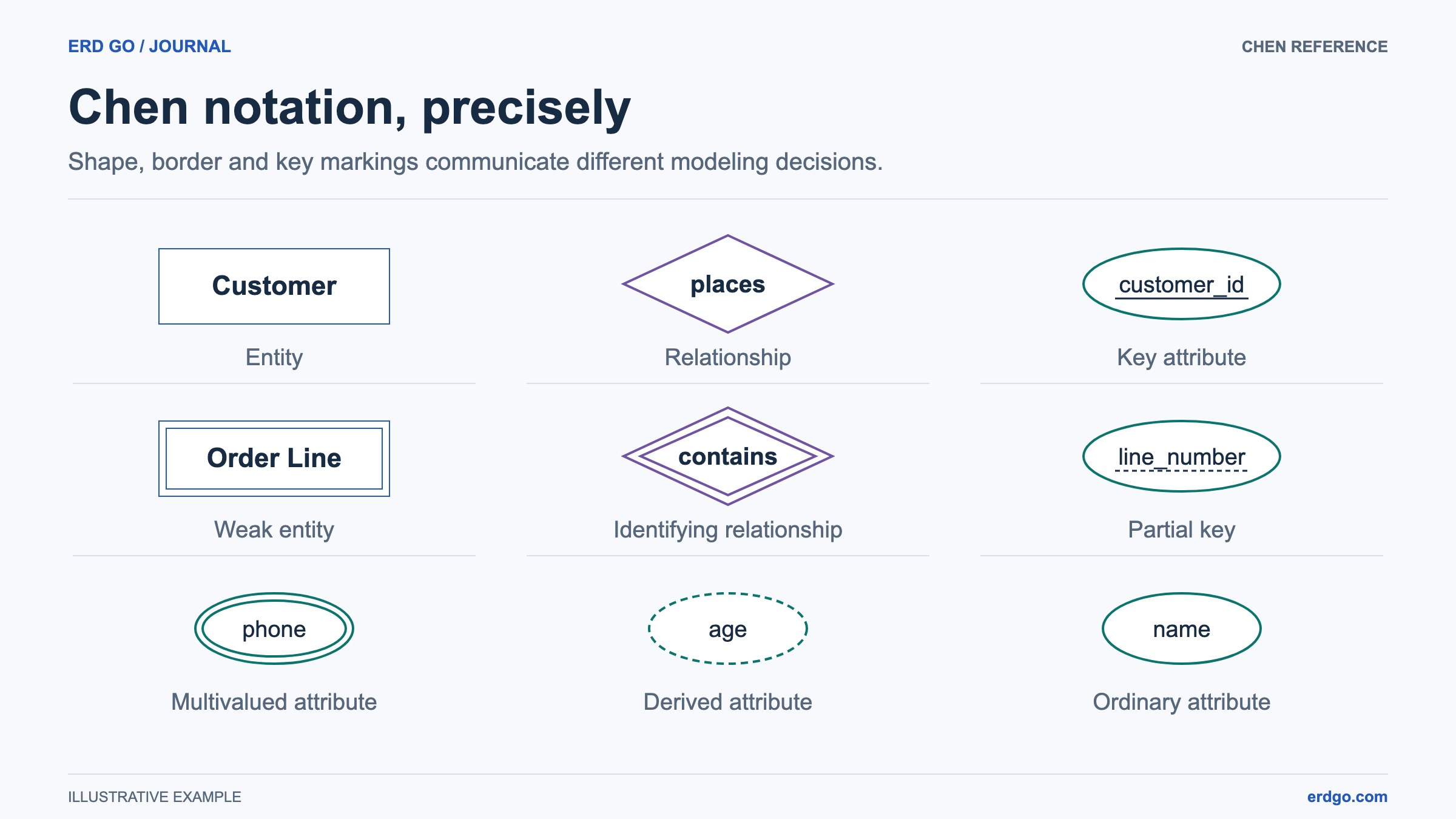
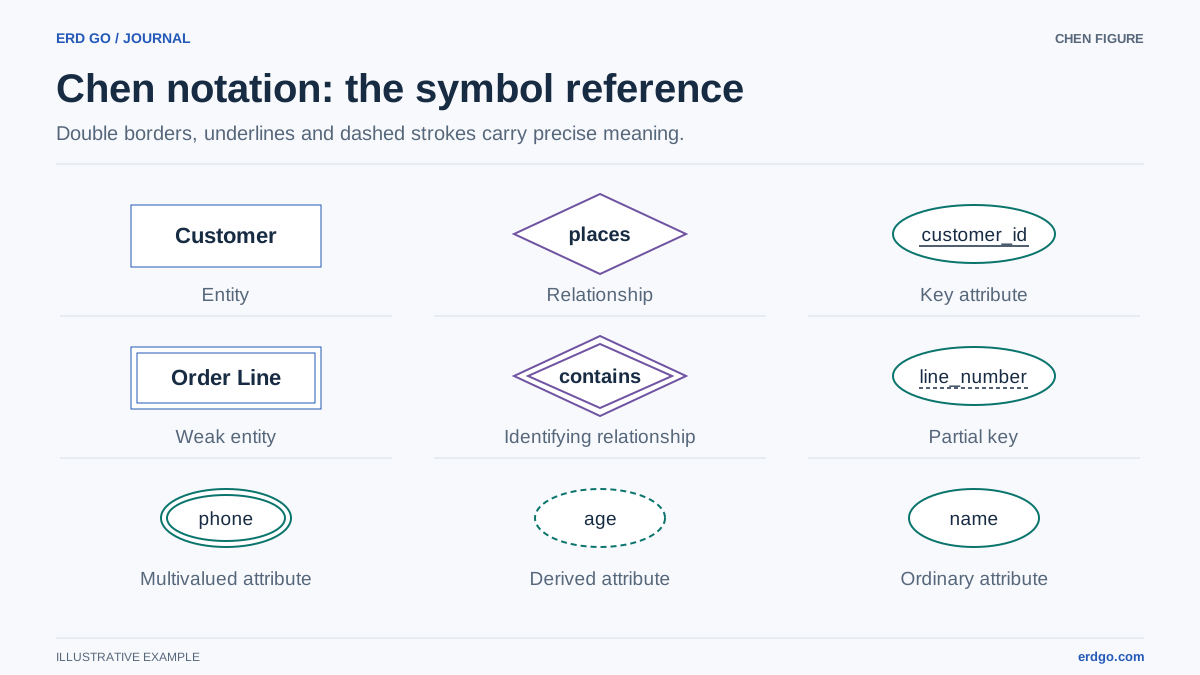
Chen notation separates the objects you store from the facts connecting them. An entity uses a rectangle, a relationship uses a diamond, and an attribute uses an oval. Keeping these concepts separate makes a conceptual diagram useful before you settle on physical tables.
In ERD Builder, create Customer and Order as entities, places as a relationship, and name as an attribute. Connect an attribute to its owner and connect a relationship to its participants. Select a shape to review its type rather than relying only on its color.
- Key attribute: an underlined name identifies instances of an entity.
- Multivalued attribute: a double oval represents several values for one instance.
- Derived attribute: a dashed oval represents a value calculated from other information.
- Composite attribute: a parent attribute groups component attributes, such as address with city and postcode.
Model weak entities and partial keys
A weak entity needs its owner to complete its identity. A line_number may distinguish Order Lines inside one Order while appearing again in another Order. The combined identity is the order identifier plus that local line number.
Draw Order Line as a Weak entity, contains as an Identifying relationship, and line_number as a Partial key. The double rectangle, double diamond, and dashed key underline distinguish this structure from an ordinary entity with an independent identifier.
Connect Order and Order Line to the identifying relationship and attach the partial key to Order Line. State the ownership rule explicitly: an Order Line cannot exist without its Order. Model checks can flag incomplete identifying structures; confirm the rule yourself using sample orders.
Separate cardinality from participation
Cardinality describes how many instances can participate. Participation describes whether involvement is required. A customer being allowed many orders does not tell you whether that customer must place an order.
Classic 1 and N labels express maximum cardinality. Min-max notation also states the lower bound: (0, N) allows none or many, while (1, 1) requires exactly one. A single participation line is partial; a double line is total. Keep line participation consistent with your intended minimum.
- Customer may register before placing an order: participation in places can be optional.
- Every Order must belong to a customer: participation on the Order side is required.
- An invalid interval, such as minimum 3 with maximum 1, needs correction before it can be applied.
Set endpoint rules in ERD Builder
Select a connector and choose the cardinality display mode. The Inspector names the endpoint next to its fields; use that entity name to verify which side you are editing. Enter minimum and maximum values deliberately and re-read the relationship in both directions.
Role names help when an entity participates more than once. For an Employee supervises Employee relationship, supervisor and report distinguish the two connections. Moving a label or changing a connector curve improves readability without assigning semantic roles.
Use the Participation setting for single or double model lines. A dashed connector is a visual line style; an annotation is a separate connector type. A note attached for explanation should remain an annotation so it is not counted as part of the model.
Avoid common notation mistakes
Do not choose Weak entity merely because a table has a foreign key. The question is whether the owner is needed for the modeled identity. Likewise, a multivalued attribute is a conceptual choice; its relational implementation usually needs its own table.
Keep a derived attribute separate from a stored input. If total is calculated from order lines, document its derivation rule in the Inspector and review how the implementation will keep it consistent. The diagram records that decision; it does not execute the calculation.
For a review, temporarily hide attributes to inspect the entity and relationship structure, then reveal them again for the key discussion. Export the complete diagram only after checking that bounds, role labels, and key markings remain readable.
References and further reading
Try the model on your own canvas
Build, check, and export a Chen or EER diagram in your browser.
Open ERD Builder →