Read the columns behind the connector
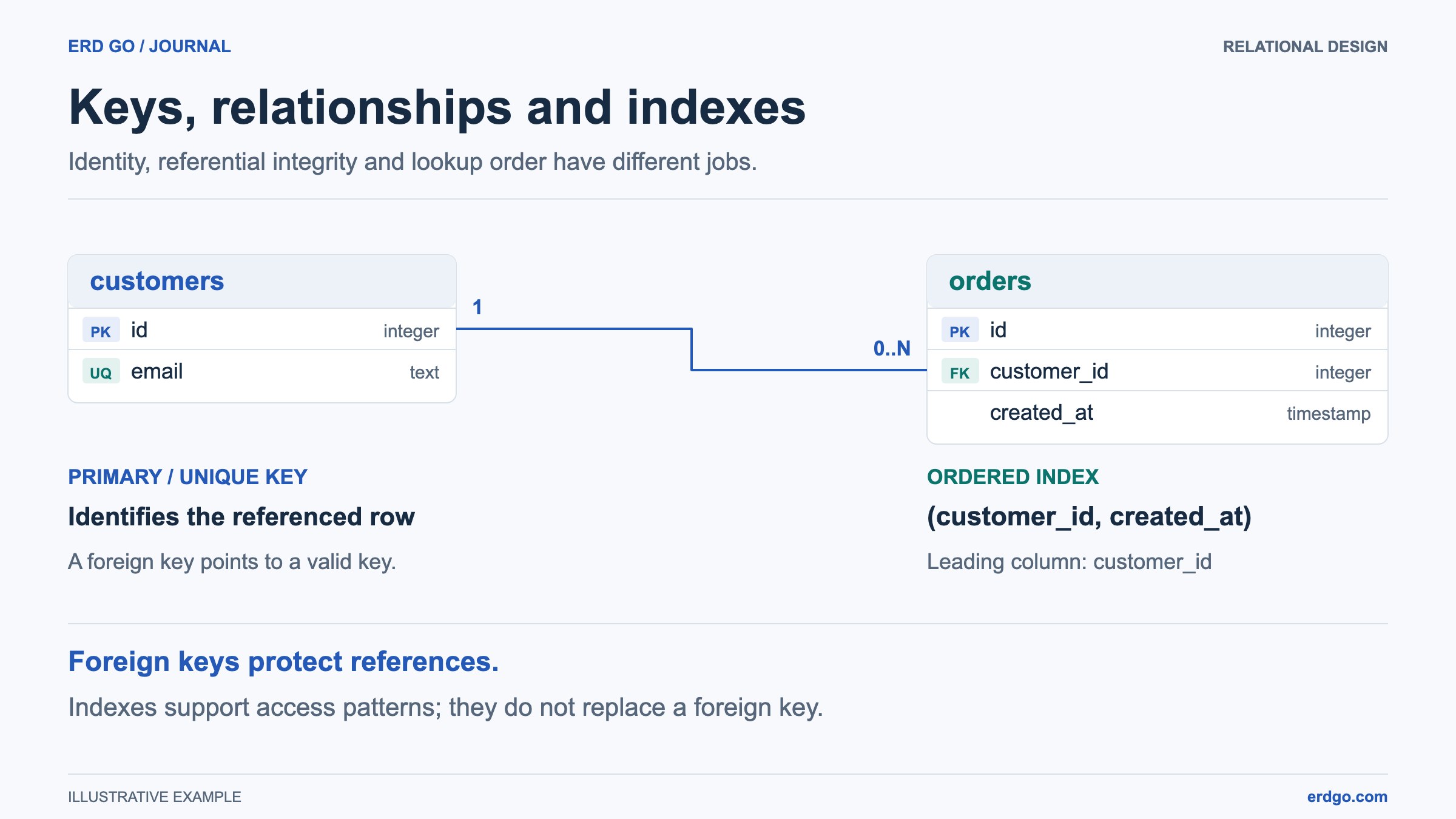
A database diagram connects named columns, not just nearby boxes. In customers.id ← orders.customer_id, orders stores the reference. A review should begin with those endpoints and the intended business rule, before line routing, colors, or table placement.
In DB Diagram, open the relationship details to inspect its source and destination. A referenced-key badge in the column editor takes you to the matching table and column. This is useful when a large design contains several customer references with different purposes.
Start with one sentence: an order belongs to one customer, while a customer can have several orders. Then check how the design expresses the sentence. A line alone does not answer whether a reference may be missing, whether values can repeat, or what happens when a parent is deleted.
Separate identity, existence, and optional values
A primary key identifies a row. A foreign key checks a child reference against its parent key. NOT NULL prevents the referencing value from being absent; UNIQUE prevents its non-null value from being reused. These constraints answer different questions and should be chosen independently.
For the customer-and-order example, keep orders.customer_id non-unique to allow repeat customers. Make it not nullable when every order must identify a customer. The foreign key still does not require a customer to have at least one order.
Use these choices as a review checklist for a single-column reference. “At most one” at the child end does not imply that every parent must have a child. Rules about lifecycle stages or mandatory child rows may need additional enforcement outside this model.
| Child foreign-key column | What the design permits | Question to ask |
|---|---|---|
| Not nullable, not unique | Each child references a parent; several children can reference it. | Must every order have a customer? |
| Nullable, not unique | A child may have no parent reference; several children can share a parent. | Can a guest order omit the account? |
| Not nullable, unique | Each child references a parent; a parent has at most one such child. | Is this really a one-to-one extension? |
| Nullable, unique | The reference is optional and non-null references cannot repeat. | How does the target database treat multiple NULL values? |
Choose a real referenced key
The destination must qualify as a referenced key, not merely look distinctive in a screenshot. DB Diagram supports a matching-type column backed by a single-column primary key, column uniqueness, or a single-column unique index. It keeps relationships attached through table and column renames.
A composite primary or unique key protects the combination of columns, not each column separately. DB Diagram can connect the complete key as one composite foreign key.
If a reference cannot be added, check that both columns still exist, their types match, and the selected destination qualifies. Do not solve the problem by adding uniqueness to a column whose real values are allowed to repeat. Reconsider the key or the relationship instead.
Use an index for a query need, not as a relationship symbol
A normal index does not add referential integrity or make values unique. DB Diagram stores named indexes as schema definitions and includes them in SQL export. Add one deliberately from the table editor; coloring a column or naming a comment “index” has no such effect.
For orders queried by customer and then date, an ordered index on (customer_id, created_at) is a candidate to evaluate. In PostgreSQL, leading equality conditions can help a multicolumn B-tree index limit its scan. That does not mean a later indexed column can never be used on its own: planner decisions and skip scans depend on the data and query.
The Review panel uses a practical prefix check when suggesting foreign-key indexes. An index beginning with customer_id covers that reference for this check; an index beginning with an unrelated column does not. This is an advisory heuristic, not an execution-plan prediction.
Database engines differ. SQLite recommends child-key indexes for efficient reference checks, while MySQL creates a suitable referencing index when needed for its foreign-key requirements. DB Diagram skips its missing foreign-key index suggestion for MySQL. Review existing indexes before adding a redundant one.
Review deletion and duplication as schema changes
Removing a table or column in DB Diagram removes relationships attached to it after confirmation. That edits the proposed model; it does not delete rows in a live database. A configured referential action in exported SQL concerns database row changes and is a separate decision.
Duplicate table creates new table and column identities, preserving definitions, indexes, comments, appearance, and self-references. Links to other tables are not copied. Inspect the duplicate before creating the external relationships it actually needs.
Duplicate column keeps its type, default, nullability, and uniqueness, but clears explicit primary-key and auto-increment flags. It does not copy relationships or named-index membership. Native type and default behavior remains, so duplicating a PostgreSQL SERIAL column still requires a deliberate generator review.
Check one scenario before handing the design over
Select a finding in Review to reveal its exact field, then decide whether the suggestion applies. A model with no findings can still have the wrong business rules. Explain a realistic insert, update, and parent deletion to another person, and compare each operation with the intended constraints.
Save the editable design or download JSON. Export SQL for the chosen dialect and validate it against the intended database version in a separate environment before deployment. DB Diagram does not execute that script against your database, and opening the SQL workspace creates a separate document.
For a team review, share a saved public read-only link or export a readable image. Keep comments close to ambiguous tables and distinguish accepted rules from questions. The useful result is a design whose constraints can be explained, not only a diagram with neatly routed lines.
References and further reading
- Erd Go: DB Diagram controls, saving, exports, and supported limits
- PostgreSQL: primary keys, unique constraints, and foreign keys
- SQLite: foreign-key direction, required parent keys, and supporting indexes
- PostgreSQL: multicolumn index order and query conditions
- MySQL: foreign-key requirements and automatic supporting indexes
Build and review your own database diagram
Start with a blank design or explore the order-system example, then keep an editable copy of your work.