SQL examples use PostgreSQL unless another dialect is named. Short snippets assume their referenced tables already exist. Validate DDL in your target database before applying it.
The Big Three: An Overview
PostgreSQL, MySQL, and SQL Server are widely used relational database systems with mature ecosystems. Yet they differ in philosophy, licensing, syntax, and feature depth — so the "best" choice depends on your project's needs.
PostgreSQL
An open-source, object-relational database known for standards compliance and extensibility. PostgreSQL supports advanced types (JSONB, arrays, hstore), full-text search, CTEs, window functions, and custom extensions like PostGIS. Its extensibility is useful when a project needs specialized types or extensions.
MySQL
An open-source relational database commonly used in web applications and the LAMP stack. Its InnoDB engine provides ACID transactions, and recent versions have closed the feature gap with PostgreSQL significantly.
SQL Server
Microsoft's flagship RDBMS. SQL Server offers tight integration with the .NET ecosystem, database tooling such as SQL Server Management Studio and the MSSQL extension for Visual Studio Code, built-in business-intelligence features, and enterprise support. The free Express edition has version-specific resource limits. Developer editions are for development and testing, not production use.
Syntax Differences at a Glance
While all three speak SQL, day-to-day syntax varies enough to trip up developers switching between engines. Here are the most common differences:
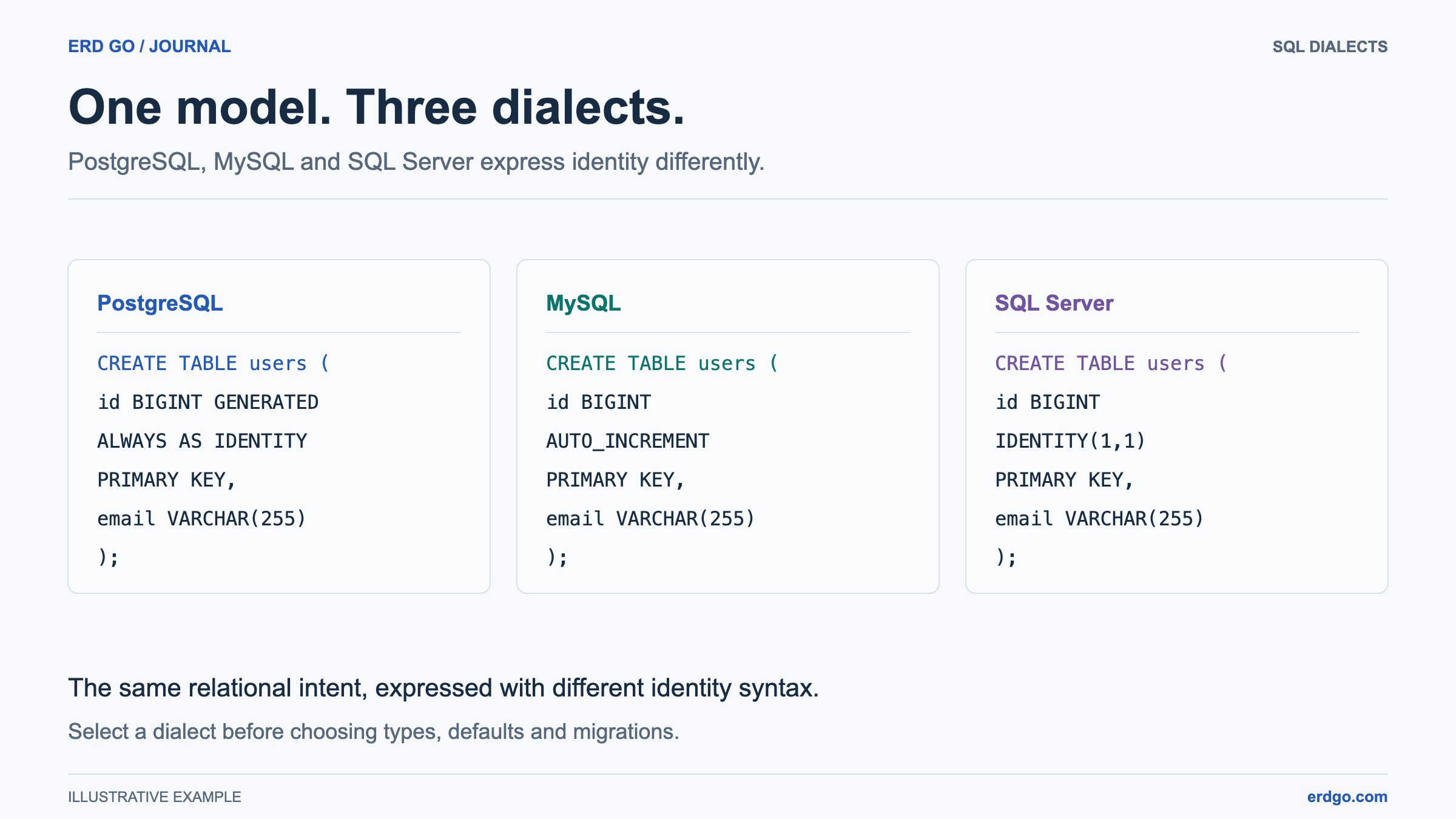
Auto-Incrementing Primary Keys
-- PostgreSQL
CREATE TABLE users (
    id SERIAL PRIMARY KEY        -- or GENERATED ALWAYS AS IDENTITY
);

-- MySQL
CREATE TABLE users (
    id INT AUTO_INCREMENT PRIMARY KEY
);

-- SQL Server
CREATE TABLE users (
    id INT IDENTITY(1,1) PRIMARY KEY
);
Identifier Quoting
-- PostgreSQL  →  double quotes
SELECT "order" FROM "user";

-- MySQL       →  backticks
SELECT `order` FROM `user`;

-- SQL Server  →  square brackets (or double quotes with QUOTED_IDENTIFIER ON)
SELECT [order] FROM [user];
String Concatenation
-- PostgreSQL
SELECT first_name || ' ' || last_name AS full_name FROM users;

-- MySQL
SELECT CONCAT(first_name, ' ', last_name) AS full_name FROM users;

-- SQL Server
SELECT first_name + ' ' + last_name AS full_name FROM users;
-- or CONCAT() in SQL Server 2012+
Limiting Results
-- PostgreSQL & MySQL
SELECT * FROM products ORDER BY price LIMIT 10 OFFSET 20;

-- SQL Server (2012+)
SELECT * FROM products ORDER BY price
OFFSET 20 ROWS FETCH NEXT 10 ROWS ONLY;
Feature Comparison
| Feature | PostgreSQL | MySQL | SQL Server |
|---|---|---|---|
| JSONB / JSON support | Excellent (JSONB indexable) | Good (JSON type since 5.7) | JSON functions since 2016; native json type in SQL Server 2025 |
| Full-text search | Built-in (tsvector/tsquery) | Built-in (FULLTEXT index) | Built-in (Full-Text Search) |
| Window functions | Full support | Since 8.0 | Full support |
| CTEs (WITH clause) | Yes (recursive too) | Since 8.0 | Yes (recursive too) |
| Materialized views | Yes | No (use workarounds) | Indexed views (similar) |
| Partitioning | Declarative (since 10) | Range, list, hash | Table partitioning |
| Custom types / domains | Yes | No | Alias and CLR user-defined types; capabilities differ from PostgreSQL domains |
| Extensions / plugins | Rich ecosystem (PostGIS, pg_trgm …) | Plugin API | CLR integration |
| Replication | Streaming & logical | Async, semi-sync, Group Replication | Replication, Always On availability groups, and log shipping; edition limits apply |
| MVCC | Yes | Yes (InnoDB) | Snapshot isolation (optional) |
Performance Characteristics
Performance depends on the workload, data distribution, version, configuration, and hardware. Compare representative queries and operational requirements instead of choosing an engine from a generic speed ranking:
- PostgreSQL: evaluate query plans, statistics, concurrency, and any extensions your workload requires.
- MySQL: evaluate the InnoDB configuration, indexes, isolation behavior, and execution plans for your actual application queries.
- SQL Server: evaluate rowstore or columnstore access paths, query plans, and the features available in your chosen edition.
In practice, the biggest performance gains come from proper indexing, query tuning, and schema design — not from switching engines. Visualise your schema in the Erd Go editor to spot relationship and indexing issues early.
Licensing & Cost
| Database | License | Free Tier | Paid / Enterprise |
|---|---|---|---|
| PostgreSQL | PostgreSQL License (MIT-like) | Open-source engine; hosting, support, and operations have separate costs | Third-party support (EDB, Crunchy, Supabase …) |
| MySQL | GPL v2 (Community) / Commercial | Community Edition; commercial editions add separate features and services | MySQL Enterprise (Oracle) — monitoring, backup, firewall |
| SQL Server | Proprietary (Microsoft) | Express: 50 GB per database in 2025, 10 GB in 2022; Developer: non-production | Standard / Enterprise; licensing model and feature limits depend on edition |
Compare total cost: licenses, hosting, backups, support, and the team’s operational experience. Consult each vendor’s current licensing terms before selecting an edition or redistributing software.
When to Pick Each Database
- Choose PostgreSQL when you need advanced data types, complex queries, spatial data (PostGIS), strong standards compliance, or its ecosystem and deployment options fit your project.
- Choose MySQL when your hosting provider already supports it, you rely on the LAMP/LEMP stack, or your team has deep MySQL expertise.
- Choose SQL Server when your stack is .NET / C#, you need tight Azure integration, your organisation already has Microsoft licensing, or you require built-in BI and reporting.
Regardless of which engine you choose, a clear schema design is critical. Use the Erd Go editor to map out your tables, relationships, and constraints visually — then test the schema and migrations in your target database.